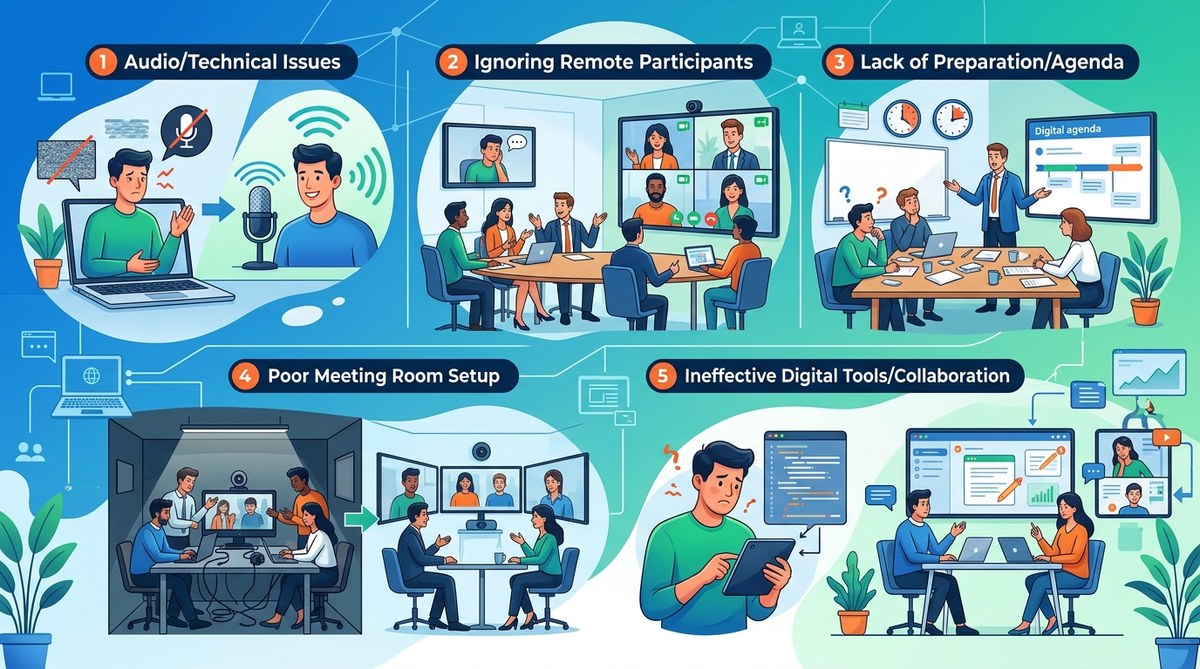
You sit down at your desk, pull up the calendar invite, and feel that familiar knot in your stomach. Another hybrid meeting. Half the team is in the conference room, the other half is scattered across home offices and coworking spaces. Within ten minutes, the remote folks are muted and forgotten, the room microphone picks up every coffee sip, and nobody has seen the agenda. It doesn’t have to be this way. Hybrid meetings are hard, but most of the pain comes from a handful of repeatable mistakes. Fix those, and you unlock meetings that actually work for everyone.
Hybrid meetings fail when we treat remote participants as second-class citizens, skip an agenda, forget to test tech, ignore time zone fairness, and let one person dominate. The solution is simple: design every meeting for the remote experience first, share the agenda 24 hours ahead, run a five minute tech check, rotate meeting times, and use round-robin check-ins. These fixes cost nothing but improve everything.
The Real Reason Hybrid Meetings Feel Broken
Hybrid work isn’t going anywhere. In 2026, most teams still split their time between an office and remote locations. But the meeting format that works for fully in-person or fully remote fails when you mix the two. The core problem: the room tends to forget the screen. Remote participants become spectators, not collaborators. When that happens, engagement drops, decisions take longer, and resentment builds. The fix starts by understanding the five most common mistakes.
Mistake 1: Treating Remote Attendees Like Virtual Wallflowers
The classic scenario. Three people sit around a table in a conference room. Two others join via video from their homes. The in-room group chats, draws on the whiteboard, and points at a physical printout. Meanwhile, the remote pair stares at a blurry camera pointed at an empty chair. They can’t see the whiteboard, can’t read the body language, and can barely hear the sidebar conversations.
How to fix it
- Make the remote experience the primary experience. Put the camera at eye level and point it at the front of the room, not the ceiling.
- Use an external microphone that picks up the whole room. Laptop mics are not enough.
- Share all visual materials digitally before the meeting. No one should be holding up a piece of paper.
- Use a round-robin check-in at the start. Ask each remote person a question before the in-room folks speak.
- If someone dials in from a https://where.team/15-coworking-spaces-with-the-best-meeting-room-technology-for-virtual-first-teams/ (coworking space with good meeting room tech), make sure their connection is stable.
Expert advice: “The moment you have a single remote participant, treat them as the most important person in the room. Design your meeting flow around their experience, not the group at the table.” – Priya K., distributed team coach
Mistake 2: No Agenda or a Vague One
An agenda that reads “Q3 planning” is not an agenda. It’s a noun. When participants don’t know what to prepare, the first ten minutes are wasted on context catching up. Hybrid adds another layer: remote folks can’t “lean over and ask Sarah what this is about.” They either sit in silence or interrupt to ask for background that the room already knows.
The solution in three steps
- Send the agenda at least 24 hours in advance. Include specific outcomes and time allocations.
- Assign a note taker and a facilitator. The facilitator keeps time and ensures remote voices are heard.
- Start with a one-minute recap. “Here’s what we need to decide today. Any quick questions before we begin?”
Use a simple table to clarify meeting roles:
| Role | Responsibility | Hybrid Twist |
|---|---|---|
| Facilitator | Keep time, manage discussion | Watch for raised hands in chat and call on remote participants by name |
| Note Taker | Capture decisions and action items | Share screen live so remote attendees see notes being written |
| Tech Host | Handle mute/unmute, breakout rooms | Test audio and video five minutes before start |
| Participant | Come prepared, engage | Use reactions and chat to signal without interrupting |
If your team struggles with agenda discipline, read our guide on https://where.team/the-15-minute-remote-stand-up-a-complete-guide-for-distributed-teams/ (running efficient stand-ups).
Mistake 3: Tech That Works for Nobody
You know the drill. The conference room camera is built into the monitor at the far end of the table. The person talking is a tiny blob in the corner. The speakerphone creates an echo every time someone in the room types on a laptop. Meanwhile, the remote colleague’s Wi-Fi drops during the key slide. Tech failures eat up at least five to ten minutes of every hybrid meeting they touch. Over a year, that’s hours of lost productivity.
A practical checklist to run before every meeting
- Confirm the room microphone is on and positioned near the speaker area.
- Close all unnecessary browser tabs on the room computer to prevent fan noise.
- Use a platform that supports screen sharing with annotation (most major tools do).
- Have a backup dial-in number ready.
- If you’re the remote person, use a wired internet connection if possible. Wi-Fi is a gamble.
When choosing a venue for hybrid meetings, consider https://where.team/15-coworking-spaces-with-the-best-meeting-room-technology-for-virtual-first-teams/ (coworking spaces with proven tech setups). They often have dedicated meeting rooms with proper cameras, microphones, and soundproofing.
Mistake 4: Scheduling That Favors One Time Zone
This is the silent relationship killer of hybrid teams. If you always schedule the 9 AM stand-up for the East Coast office, your West Coast people join at 6 AM. If you hold the weekly review at 4 PM Pacific, your London team stays until midnight. Over time, the same people always sacrifice their sleep or family time. It breeds resentment and burnout.
How to rotate fairly
- Use a rolling schedule that shifts meeting times every month or quarter.
- Use a tool like World Time Buddy or a shared calendar with time zone overlays.
- Record meetings for those who absolutely cannot attend live. But be careful: recordings are not a substitute for participation. Our article on https://where.team/should-you-record-every-remote-meeting-privacy-compliance-and-best-practices/ (meeting recording best practices) covers privacy and compliance.
- Establish a “core hours” policy. For example, 10 AM to 3 PM Eastern is the overlap window. No meeting can start outside that window unless it’s a special case and rotated.
A simple bullet list for time zone etiquette:
- Never schedule a recurring meeting that forces the same person to attend outside their workday for more than two consecutive months.
- If you must meet outside core hours, keep it under 30 minutes and alternate.
- For global teams, aim for the “least bad” time, not the most convenient for the majority.
Mistake 5: Letting One Voice Dominate
In a hybrid setting, dominance is easier to get away with. The loudest person in the room controls the conversation. Remote participants often hesitate to interrupt. The result: decisions reflect only the opinions of the people physically present or the most talkative person on the call. Brainstorming sessions suffer the most. You get groupthink instead of genuine innovation.
How to reclaim balanced participation
- Use a “talking stick” technique: the facilitator calls on the next speaker.
- Use the chat as a secondary channel. Ask people to drop their ideas there before anyone speaks.
- For key decisions, use a silent polling tool within your video platform. This gives introverts and remote members equal weight.
- If you notice one person speaking more than 70% of the time, gently redirect. “Thanks, Jamie. I’d love to hear from Maria on the screen about this point.”
Running a brainstorming session across time zones is tricky. Our guide on https://where.team/running-effective-brainstorming-sessions-when-your-team-is-scattered-across-6-time-zones/ (brainstorming with scattered teams) offers a step-by-step game plan.
A Quick Reference: Mistake vs. Fix Summary Table
| Mistake | The problem | One small fix to try tomorrow |
|---|---|---|
| Remote ignored | In-room group forgets the screen | Start every meeting with a remote check-in round |
| No real agenda | Participants show up unprepared | Send an agenda that lists decisions, not topics |
| Bad tech | Echo, bad video, lost connection | Run a five-minute audio/video test before each meeting |
| Time zone bias | Same people always suffer | Rotate meeting times every month |
| Dominant voice | One person steers the whole meeting | Use silent polling for key decisions |
Your Next Hybrid Meeting Will Be Better
None of these fixes require a bigger budget or fancy software. They require awareness and a tiny bit of discipline. Pick one mistake to address this week. Maybe you start by always calling on the remote participant first. Maybe you enforce a strict agenda rule. Once that becomes habit, tackle the next one. Over time, your hybrid meetings will feel less like a compromise and more like a superpower. Your team will thank you. And the knot in your stomach? It will finally loosen.
If you need a reliable space with solid meeting tech for your next hybrid session, check out https://where.team/how-to-choose-the-perfect-coworking-space-for-your-remote-team-s-quarterly-meetup/ (our guide to choosing a coworking space for team meetups). Because sometimes the room matters just as much as the rules.
